CyberHUB-AM has analyzed a phishing email impersonating MDI Armenia/CyberHUB and using a professional-looking HR policy pretext to lure the recipient into scanning a QR code and visiting a likely credential-phishing website.
What makes this case notable is that the attackers did not rely on a crude spoof. Instead, they used a properly configured email delivery setup that passed SPF, DKIM, and DMARC, making the message look more trustworthy to email systems and increasing the chances of inbox delivery. The lure then shifted from the email body into an attached PDF, where the victim was instructed to scan a QR code to review an “updated HR policy document.”
This is a reminder that not every dangerous phishing email looks broken or obviously fake. Some now arrive through legitimate cloud infrastructure, use polished formatting, and hide the real malicious action one step deeper — in an attachment, QR code, or fake sign-in page.
The Lure: Fake HR Communication
The email arrived with the subject:
“Message From Mdi armenia’s HR_Portal April 02, 2026 97101”
The sender name was displayed as “Mdi armenia”, while the actual sender address used the domain indianexpressonline[.]org. This mismatch is a major warning sign. The attackers tried to borrow the trust associated with a known Armenian civil society organization, while sending the message from an unrelated domain.
The attached PDF was personalized with the target’s email address and presented as an updated HR policy document that required review and digital verification. The wording created a sense of urgency by referring to policy updates, wage and bonus information, and a short validity window.
The interesting point: attackers sent the message from MDI Armenia fake HR to the personal email of one of the co-founders of CyberHUB. Which means that attackers made a research and found out that MDI Armenia and CyberHUB are related organisations and internal flows can be merged.
The Deception Tactics
1. Professionally configured email delivery
The email headers show that the message was delivered through Amazon SES infrastructure and passed SPF, DKIM, and DMARC checks. This is important: passing email authentication does not mean a message is safe. It only means the sender had control over the sending configuration for that domain or service.
This is exactly the kind of setup attackers use when they want phishing emails to bypass basic filtering and land directly in the inbox.
2. Identity mismatch
Although the sender claimed to be MDI Armenia, the email did not come from MDI Armenia’s real public domain. MDI Armenia’s official website is published on mdi.am, while the phishing email used indianexpressonline[.]org. That discrepancy alone should have been enough to stop the interaction.
Possibly attackers used hacked email. Indianexpressonline[.]org is a domain name registered in 2018 and redirecting to the legitimate media URL indianexpress.com.
3. Minimal body, real lure in the attachment
The email body itself was largely a shell. It contained a generic “Sign-in verification” message with broken or empty elements, while the real action was moved into the attached PDF.
This is an increasingly common evasion tactic. By keeping the email body relatively empty and moving the social engineering into the attachment, attackers reduce the number of obvious malicious indicators visible to email scanners and to hurried recipients.
Technical Analysis: The Hook
The attached PDF instructed the recipient to scan a QR code in order to access the “updated HR policy document.” CyberHUB-AM extracted and decoded that QR code.
It pointed to:
hxxps://surfscale[.]surf/#<victim_email>
surfscale[.]surf domain was registered the day before the attack
The exact landing URL also included multiple tracking and session parameters, including a session token, a timestamp, version-like values, and a victim-specific email fragment. The presence of the victim email in the URL fragment strongly suggests that the phishing page was personalized for the recipient.
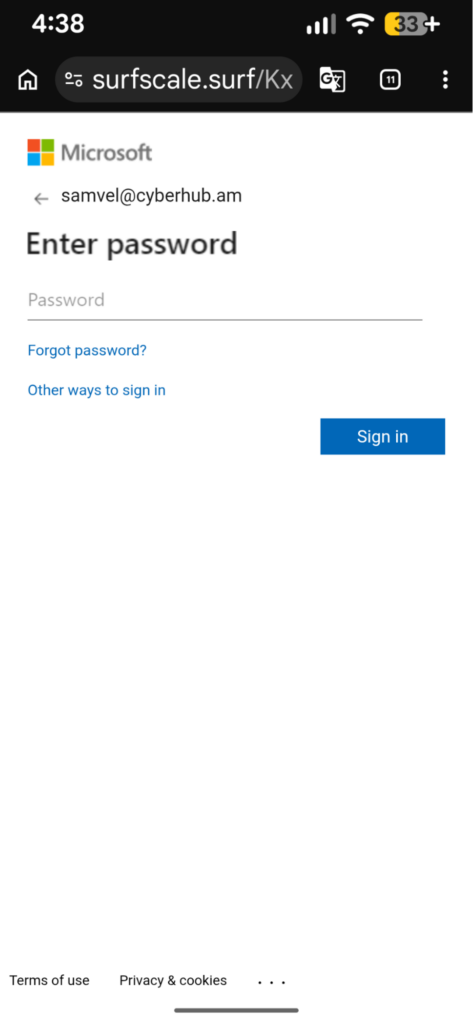
Screenshots show how the phishing site is trying to steal credentials of the targets email, mimicking Microsoft`s login page.
 |
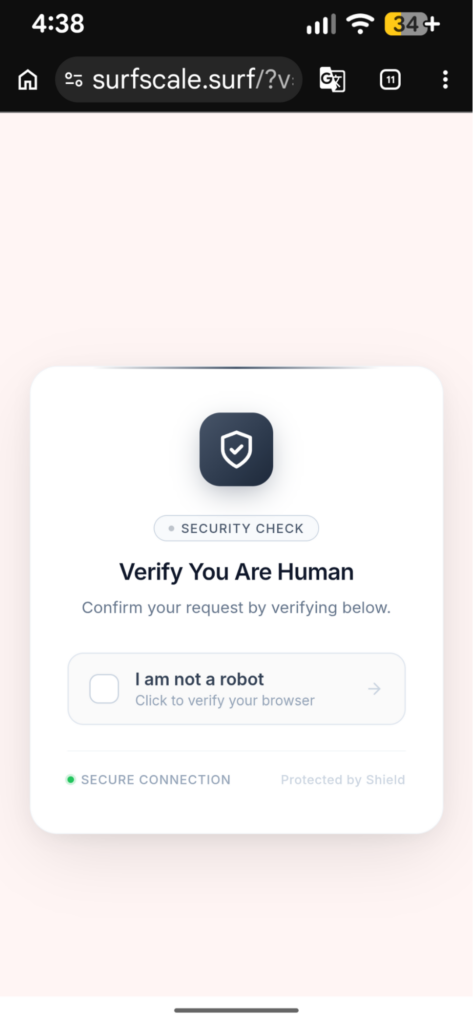 |
This kind of structure is consistent with modern phishing kits. The page can use the victim’s email address to pre-fill a login form, make the page look more convincing, and track which target opened the link. The session parameters can also help the operator manage campaigns, filter traffic, and serve different content depending on the visitor.
Why This Matters
This case reflects several broader phishing trends we are seeing more often:
- Authenticated phishing: attackers use real cloud mail services instead of crude spoofing
- Attachment-led deception: the real lure is moved into a PDF instead of the email body
- QR-code phishing: recipients are pushed to scan rather than click
- Victim personalization: the destination is tailored to the target’s mailbox or identity
These methods make phishing attempts more believable, harder to detect at a glance, and more likely to succeed against busy professionals.
How to Protect Yourself
To stay safe from similar attacks, we recommend the following:
Check the real sender domain carefully.
Do not trust the display name alone. If an email claims to come from an organization you know, verify that the domain is actually theirs.
Do not trust a message just because it passed SPF, DKIM, or DMARC.
These checks can also pass on attacker-controlled infrastructure.
Be cautious with QR codes in unsolicited documents.
Scanning a QR code is the same as clicking a link. Treat it with the same level of suspicion.
Watch for personalized phishing pages.
If a page already knows your email address, that is not proof of legitimacy. Attackers often pre-fill this information to create trust.
Verify through another channel.
If you receive an unexpected HR, legal, or executive document, confirm it through Signal, phone, or the organization’s known official email address.
Use strong MFA.
Authenticator apps or physical security keys provide better protection than SMS where possible.
Report suspicious emails quickly.
Early reporting helps identify whether others were targeted with the same infrastructure.
Indicators of Compromise
Sender address:
donotreply[@]indianexpressonline[.]org
Displayed sender name:
Mdi armenia
Subject:
Message From Mdi armenia’s HR_Portal April 02, 2026 97101
Source IP:
76.223.181[.]83
Mail infrastructure hostname:
c181-83.smtp-out.ap-south-1.amazonses[.]com
Phishing domain:
surfscale[.]surf
QR destination pattern:
hxxps://surfscale[.]surf/#<victim_email>
Attachment name:
Mdi armenia_HR POLICY_<victim_email>_97101.pdf
Attachment SHA256:
7573ce2355f5f8170d8d3a6afdb3643389765ea503efa30bb6f195c97be656b6
Final note
This incident shows how phishing is evolving: less noisy, more targeted, and more professional in appearance. Even experienced users can be pressured by a message that appears relevant, personalized, and technically well-delivered.
If you have received a similar email, or if your organization has seen related activity, contact CyberHUB-AM and preserve the original message, attachment, and any URLs involved.