A sophisticated spear-phishing campaign was detected on March 3, 2026, specifically targeting Armenian civil society leaders, known for their engagement in the process of ensuring free, fair and democratic process ahead of the June 7, 2026 Parliamentary elections. The attack leverages high-profile impersonation and deceptive infrastructure to access the target’s mailboxes.
Threat researcher Etienne Maynier and CyberHUB-AM, have analyzed this threat to help our community stay protected. Here is the breakdown of how the attackers operate and what you should look out for.
The Lure: Political Impersonation
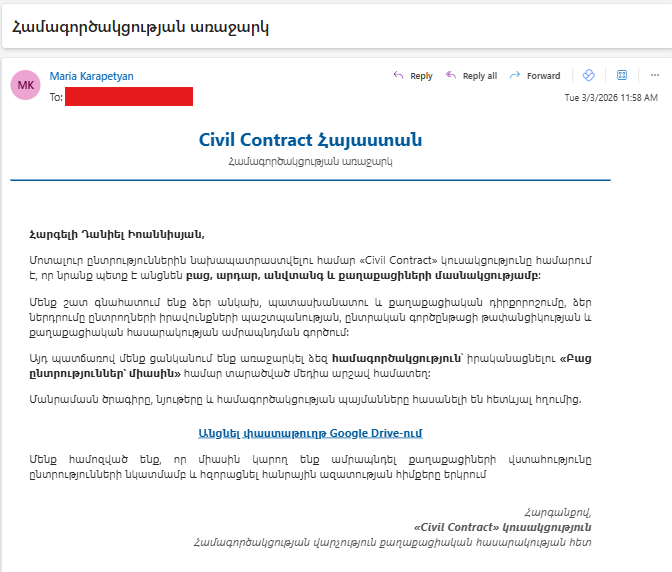
The attackers are impersonating Maria Karapetyan, a prominent member of the “Civil Contract” (Քաղաքացիական պայմանագիր) party. By using a recognized political figure, the threat actors aim to create a sense of urgency and legitimacy. The substandard quality of the Armenian language used suggests the involvement of AI or translation tools, indicating the attackers are not native Armenian speakers.
The Deception Tactics
The Email Content: Written in professional Armenian, the email invites the recipient to review a “proposal for cooperation.”
Typosquatting: The sender’s address uses the domain civilcontact.am. At first glance, this looks official, but it is a “look-alike” domain designed to mimic legitimate entities.
Bypassing Security: The attackers have professionally configured their email infrastructure. The malicious emails successfully pass SPF, DKIM, and DMARC checks, meaning they are less likely to be flagged as spam by Gmail or Outlook.
Technical Analysis: The Hook
The email includes a link to a domain that mimics the Google Drive domain and to a page that looks like a Google Drive folder:
![Screenshot of https://drive.google.sharefolders[.]org/ taken on March 4th 2026](https://cyberhub.am/wp-content/uploads/2026/03/1-1024x479.png)
![Screenshot 2 of https://drive.google.sharefolders[.]org/ taken on March 4th 2026](https://cyberhub.am/wp-content/uploads/2026/03/2-1024x478.png)
In that case, the malicious page redirects to the following page: hxxps://accounts.google[.]com/o/oauth2/v2/ auth?client_id=381379513295kgnf1g8rgfh7gb2f7s5gko7h02uh6l6s.apps.googleusercontent.com&redirect_uri=https://drive.google.sharefolders.org&scope=https:// www.googleapis.com/auth/ gmail.modify&response_type=code&access_type=offline&prompt=consent &include_granted_scopes=true
This page will request authorization of access to an OAuth app to the target’s Google account:
- For the OAuth app with id 381379513295kgnf1g8rgfh7gb2f7s5gko7h02uh6l6s.apps.googleusercontent[.]com
- Asking to grant read and write access to all Gmail emails (see documentation here)
- And redirects to the malicious website https://drive.google.sharefolders[.]org after the authorization is granted.
Due to many OAuth abuse cases in the past, Google is now requiring OAuth apps that request high-privilege to go through a risk-assessment and during our tests, it seems that the OAuth apps wasn’t approved by Google making the attack unsuccessful:
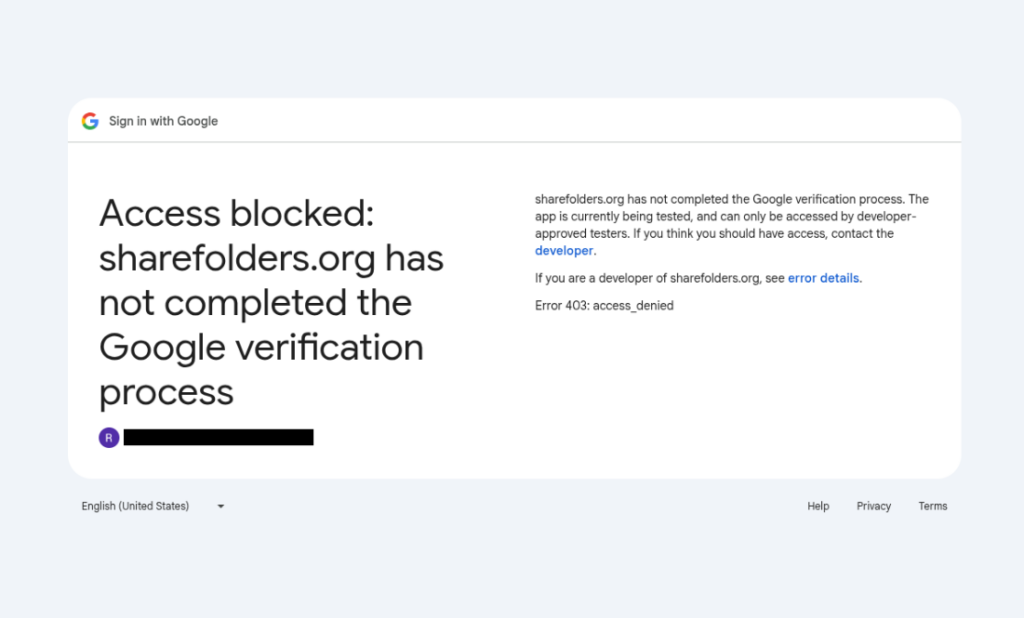
This app was created using the Google account melissajchaves18[@]gmail.com:
2. Infrastructure
This malicious domain drive.google.sharefolders[.]org is hosted on the Hostinger server 187.77.12.131 which also hosts the following domains
doc.google.sharefolders[.]org
drive.google.formshare[.]cloud
doc.google.formshare[.]cloud
An analysis of registration date for these domains and of certificate creations shows that while the first domain was registered in late December 2025, the phishing campaign only started on February 26th:
| Date | Event |
| 2025-12-05 15:17:31 | Registration of formshare[.]cloud at NameSilo |
| 2025-12-25 | Registration of civilcontact.am at Hayhost.am |
| 2026-02-26 07:16:43 | Creation of a TLS certificate for doc.google.formshare[.]cloud |
| 2026-02-26 10:47:21 | Registration of sharefolders[.]org at Hostinger |
| 2026-02-26 10:00:54 | Creation of a TLS certificate for sharefolders.org |
| 2026-02-26 11:00:12 | Creation of a TLS certificate for drive.google.formshare[.]cloud |
| 2026-03-02 09:45:06 | Creation of a TLS certificate for doc.google.sharefolders[.]org |
| 2026-03-03 07:58:42 | Phishing Email |
Threat Context: Who is Behind This?
The tactics, techniques, and procedures (TTPs) observed in this campaign align with known Russia-nexus threat actors, specifically groups like COLDRIVER or UNC4057.
These groups have a history of targeting civil society, NGOs, and government entities across the Caucasus and Ukraine. Their primary objective is usually espionage—gaining access to private communications and internal documents.
How to Protect Yourself
To stay safe from these targeted attacks, we recommend the following steps:
Check the Domain Carefully: Always hover your mouse over links before clicking. If the domain (the part before the last .com or .org) looks suspicious or different from the official site, do not click.
Pay attention to Google authorization forms: OAuth applications are regularly used in phishing campaigns to try to access sensitive data in Google accounts (emails, documents, etc). It is extremely important that you pay attention to any authorization you give to your Google account. You can always review third-party apps having access to your Google account in the Third-party apps and services of your Google settings page. The authorization form to a malicious application will look like this:
Authorization form to a malicious OAuth application in 2019 (Source:Amnesty International)
Enable Multi-Factor Authentication (MFA): Use a physical security key (like YubiKey) or an authenticator app. Even if an attacker steals your password, they won’t be able to access your account without the second factor.
Verify via Secondary Channels: If you receive an unexpected document from a high-profile figure, contact them through a different platform (Signal, phone call, or official work email) to confirm they actually sent it.
Report Suspicious Activity: If you receive an email similar to the one described above, please report it to us at CyberHub.am.
Enable Google Advanced Protection: For the highest level of security against targeted attacks, it is strongly advised to enable Google’s Advanced Protection Program.
Stay Vigilant: Cyber-espionage groups often perform deep reconnaissance on their targets. If an email feels “too relevant” but slightly off, trust your instincts.
Indicators of compromise
drive.google.sharefolders[.]org
doc.google.sharefolders[.]org
drive.google.formshare[.]cloud
doc.google.formshare[.]cloud
sharefolders[.]org
formshare[.]cloud
civilcontact[.]am
187.77.12.131
cooperation[@]civilcontact.am
Oauth id: 381379513295- kgnf1g8rgfh7gb2f7s5gko7h02uh6l6s.apps.googleusercontent[.]com OAuth registration email: melissajchaves18[@]gmail.com
This report was published in collaboration with Etienne Maynier, Technologist at Human Rights Watch and as part of a collaboration within the CiviCERT.