One of the most common social engineering attacks on Telegram today doesn’t look like an attack at all. It starts with something innocent — even emotional.
“Hi, can I ask you a favor?
A child from my family is participating in a charity drawing contest.
Winning means a chance to get a treatment grant.
Please vote if you can.”
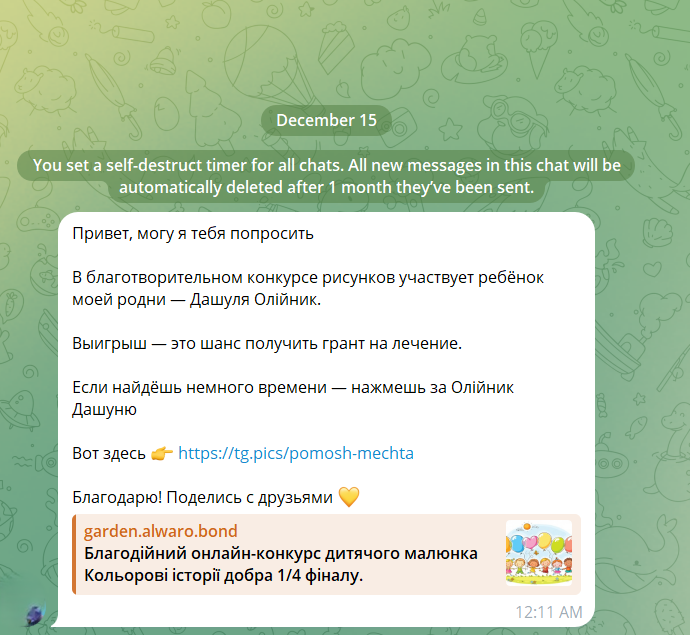
The message often comes from someone you already know: a colleague, a distant relative, a friend you haven’t spoken to in a while. That’s why it works.
Let’s break down how this attack works step by step, using a real-world example.
Step 1: The Hook — Emotional and Trust-Based
The message appeals to:
-
empathy (“a child”, “treatment”, “charity”),
-
urgency (“contest”, “final round”),
-
trust (“sent by a known contact”).
At this stage, there are no obvious red flags. The attacker is using a compromised Telegram account, not a fake one.
Step 2: The Link — Looks Harmless, Isn’t
The message includes a link that appears to be a Telegram-related domain, for example:
However, this is only a visual disguise.
Behind the scenes, the link redirects to something else entirely, such as:
This technique relies on:
-
URL shorteners,
-
redirect chains,
-
dynamically changing behavior depending on who opens the link and how.
Step 3: The Fake Contest Page — Professionally Designed
 When opened, the page looks legitimate:
-
a charity art contest,
-
children’s drawings,
-
countdown timers,
-
sponsor logos,
-
“Vote” buttons.
Nothing screams “scam”.
This is intentional. Attackers invest real effort into design and credibility, knowing that suspicion kills conversion.
Step 4: Adaptive Behavior — Different for Scanners, Different for Users
When the link is analyzed using tools like URLScan.io or VirusTotal, the site may:
-
redirect to TikTok,
-
show unrelated content,
-
appear inactive or harmless.
But when opened from:
-
a legitimate browser,
-
a mobile device,
-
a fresh IP address,
…the behavior changes.
This evasion technique helps the scam survive automated security checks and manual analysis.
Step 5: “Vote Verification” — The Real Attack
Clicking “Vote” leads to another page that looks like a Telegram interface:
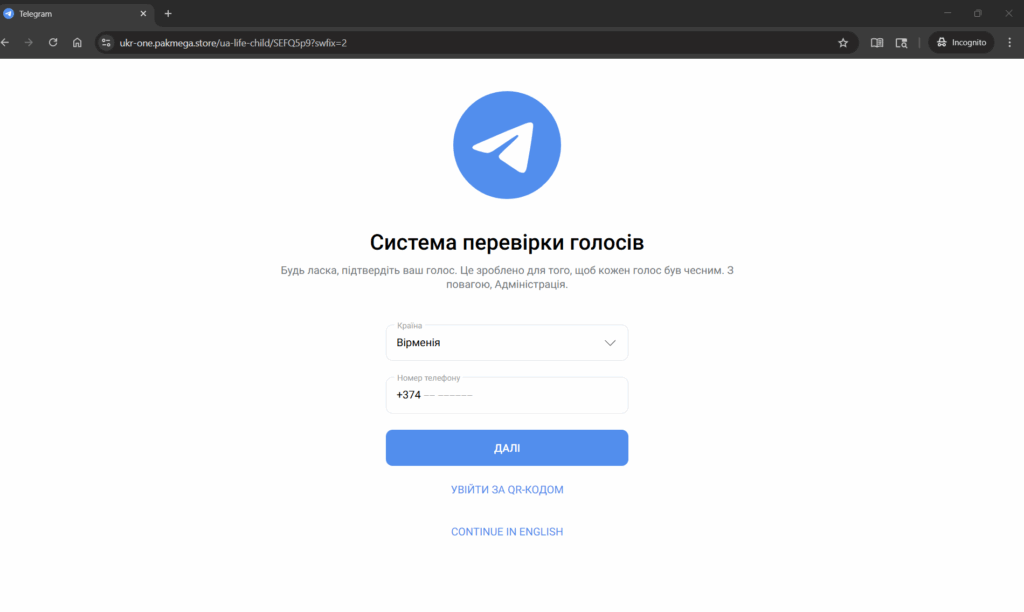
hxxps://ukr-one[.]pakmega[.]store/ua-life-child/...
The page claims to be a “vote verification system” and asks for:
-
country,
-
phone number.
This is the critical moment.
What actually happens:
-
The site initiates a real Telegram login request in the background.
-
Telegram sends a legitimate login code to the victim.
-
The phishing page asks the user to enter that code.
-
If entered, the attacker gains full access to the Telegram account.
In testing, even fake codes are immediately rejected — a strong indicator that the page is interacting with Telegram’s real authentication flow.
This is not a fake form.
This is live account hijacking.
Key Red Flags to Watch For
🚩 “Vote” or “support” requests sent via Telegram
🚩 Links that look Telegram-related but aren’t telegram.org or t.me
🚩 Any request to enter a Telegram login code outside the Telegram app
🚩 “Verification” pages that ask for your phone number
What To Do If You Encounter This
-
❌ Do not click the link
-
❌ Never enter your Telegram login code on a website
-
✅ Warn the contact via another channel (they are likely compromised)
-
✅ Report the message to Telegram
-
✅ Enable Two-Step Verification in Telegram settings
If you already entered your phone number or code:
-
immediately log out of all sessions,
-
reset your Telegram password,
-
re-enable 2FA,
-
warn your contacts.