Transparency International Armenia has recently been targeted by a phishing campaign, which utilized a chain of PDF – > Google Map redirect -> AWS infrastracture for the attack.
The attack began with an emails that appear to be a legitimate notification about a document pending review.
The emails had a subject line “Documents Pending your review” and a fake reference ID to appear legitimate. The sender’s address in the 3 observed cases came from Indian domain medinex[.]in.
The email contained a PDF attachment, which featured a prominent “Open Document” button. This is the core of the attack. This button contains a hidden link that directs the victim to a malicious website. This website could be a fake login page designed to steal your email and password, or it could automatically download malware onto your computer.
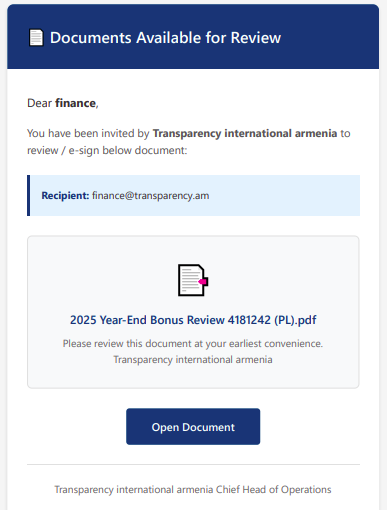
On mouseover the link seems to point to Google Spain, but redirects to an s3 bucket on Amazon (see the defanged url below).
hxxps:[//]maps.google.es/url?q=hxxp%3A%2F%2Fbombapratclfnbjsmlkd58493849indexhtml.s3-website-us-east-1[.]amazonaws.com&sa=D&sntz=1&usg=AOvVaw0vOqyxrJZxxTHfJVuJCmCb.
Red Flags: How to Spot This Phishing Attack
- Generic Greetings and Sense of Urgency: The email may use a generic greeting like “Dear finance” and language that pressures you to act quickly (“at your earliest convenience”).
- The PDF is an Image, Not a Document: If you open the PDF and it’s just a single image with a button, be very suspicious. There is no reason for a legitimate document to be sent this way.
- Mismatched Sender: Even if the sender’s domain looks legitimate, ask yourself if it makes sense for this organization to be sending you this type of document. In our case, the email came from a medical supply company in India, which has no logical connection to our financial documents.
- Hover Before You Click (If You Must): While we recommend not opening these attachments at all, if you are unsure, you can sometimes hover your mouse over the button (without clicking!) to see the destination URL. If it looks suspicious, it is.
What to Do if You Receive a Suspicious Email
1. Don’t Click! Do not click on any links or buttons in the email or attachment.
2. Do Not Reply. Replying confirms your email address is active.
3. Delete the Email. Remove it from your inbox.
4. Report It. Use your email client’s “Report Phishing” feature. This helps email providers block similar attacks in the future.
5. Alert Your Team. Share this information with your colleagues, especially those in finance and administrative roles, who are often the primary targets.
Stay Vigilant
Phishing attacks are becoming more sophisticated. By staying informed and vigilant, we can protect our organizations from these threats. Please share this information with other NGOs in your network to help keep our community secure.